
















How to choose the right Industrial Label Printer
- Posted on
- By Ivan Marquez
- Posted in Brady Label Printer, Industrial Safety Label Printer, Label Printer, Safety Label, Safety Label Printer
- 0

Learn how to choose an industrial label printer. Compare Brady printers, label materials, print technologies and ISO safety sign requirements.
How to choose the right Industrial Label Printer for your application?
Industrial label printers play an important role in producing safety labels for machinery and industrial workplaces. Selecting the right printer involves evaluating printing technology, material compatibility, label durability, and application requirements.
This guide explains the key selection criteria and compares different industrial label printers to help you choose the most suitable solution for your safety labeling needs.
What is an industrial label printer?
An industrial label printer is a printing device used to produce warning labels, safety signs, and hazard identification labels for machinery and industrial environments.
These labels help operators and maintenance personnel identify hazards, understand safety precautions, and recognize residual risks.
Unlike standard office labels, industrial safety labels must be designed to withstand demanding conditions, including mechanical wear, chemicals, oils, moisture, temperature variations, and UV exposure. Industrial label printers support these requirements through compatible printing technologies and specialized label materials.
Why choosing the right industrial label printer matters
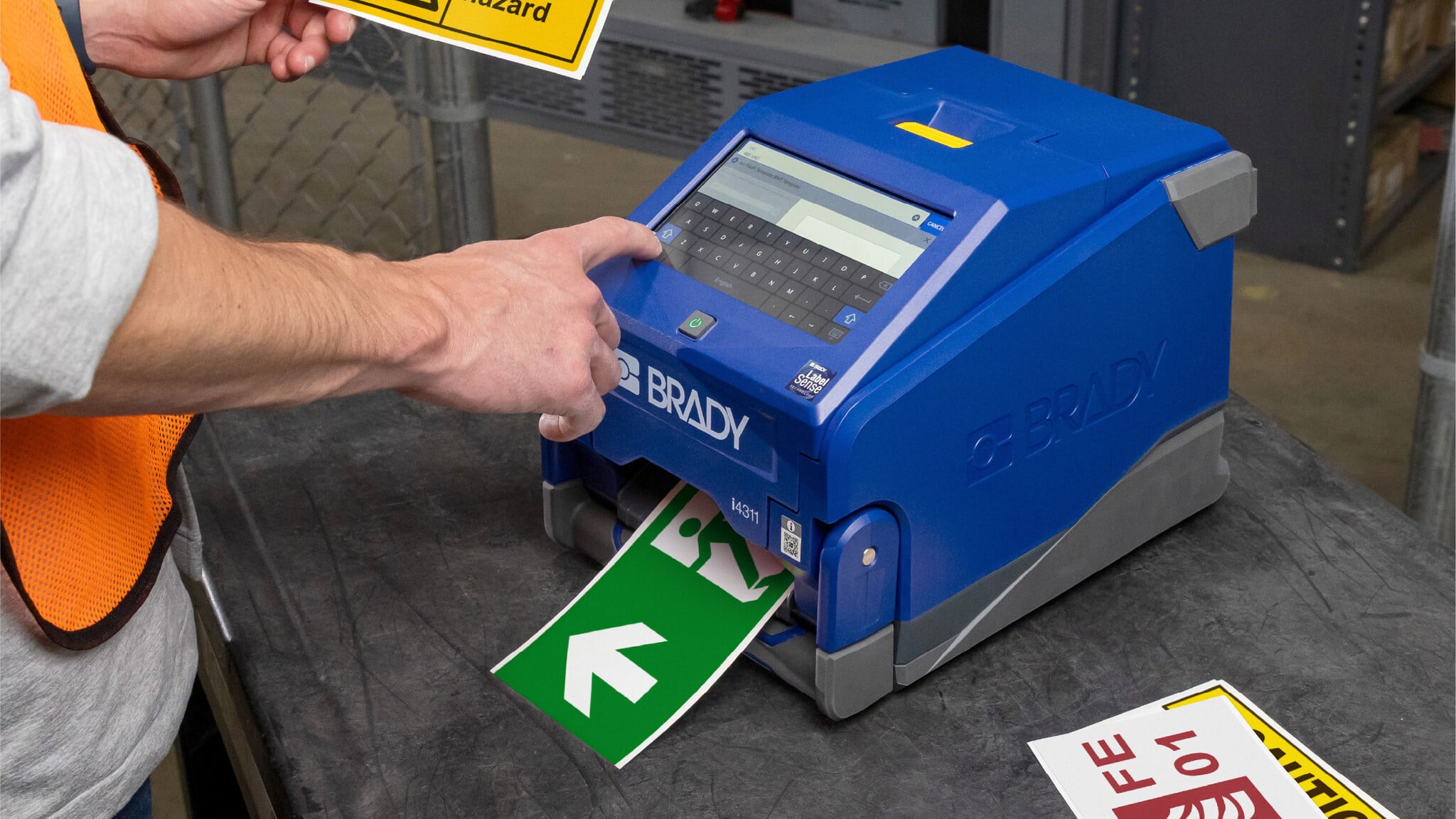
Industrial label printers differ significantly in printing technology, resolution, supported materials, label dimensions, production capacity, and connectivity. Understanding these differences helps organizations select equipment suitable for their labeling requirements.
External conditions can affect both the printed information and the label material itself. An unsuitable label may fade, become difficult to read, detach from the machine, or deteriorate before the end of its intended service life.
For machine builders and safety managers, this makes printer selection an important part of maintaining consistent safety identification.
Label printers have different specifications and outcomes
Some printers prioritize portability and on-site identification, while others are designed for high-volume printing, larger labels, or detailed graphical output.
Important specifications include printing resolution, printing speed, maximum supported label width, cutting functionality, connectivity, software compatibility, and recommended printing volume.
For example, a printer with a resolution of 300 dots per inch (dpi) can generally reproduce finer text and graphical details than a comparable 203 dpi printer at the same physical print size. However, resolution alone does not determine print quality. The label material, ribbon or ink, and print settings also influence the result.
Similarly, a printer capable of producing thousands of labels per day may be appropriate for centralized industrial identification, but it may be unnecessarily complex for occasional on-site maintenance work.
The objective is not necessarily to select the printer with the highest specifications, but the printer whose capabilities match the required label format, operating environment, and printing workload.
Why Brady?
Brady Corporation is a manufacturer of industrial identification and workplace safety products, including label printers, industrial labels, safety signage, and equipment identification solutions.
In addition to its range of industrial label printers, Brady offers labelling materials for different applications and operating environments, including heat-resistant materials, self-laminating labels, and durable materials designed for demanding industrial conditions.
Brady also offers Brady Workstation software for designing industrial labels with text, graphical elements, and standardised identification layouts. Available features and software compatibility depend on the selected printer model.
Its printer range also supports different operating workflows. Portable units facilitate labelling near the installation point, while desktop systems can support centralized label production and larger-format safety identification.
Technical safety standards and regulations that affect machine guarding safety labels
Industrial safety labels may be designed according to internationally recognised standards that address graphical symbols, safety colours, sign layouts, and product safety information.
Standards such as ISO 7010 and the ISO 3864 series support consistent safety communication. Their application depends on the relevant regulatory framework and the intended use of the label.
ISO 7010
ISO 7010:2019, Graphical symbols - Safety colours and safety signs - Registered safety signs, specifies registered safety signs used for accident prevention, fire protection, health hazard information, and emergency evacuation.
Warning signs: Yellow triangular signs with black symbols identify hazards

Mandatory action signs: Blue circular signs communicate required actions

Prohibition signs: Red circular signs with diagonal bars indicate prohibited activities

Emergency signs: Green signs identify emergency escape routes and first-aid facilities

Fire Safety signs: White pictogram on a red square or rectangular background to identify the location of firefighting equipment

ISO 3864-1
ISO 3864-1:2011, Graphical symbols - Safety colours and safety signs - Part 1: Design principles for safety signs and safety markings, establishes design principles for safety colours, geometric shapes, safety signs, and safety markings.
ISO 3864-2
ISO 3864-2:2016, Graphical symbols - Safety colours and safety signs - Part 2: Design principles for product safety labels, establishes design principles for safety labels used on products, including machinery and industrial equipment.
Key factors when choosing an industrial label printer
Industrial safety label printers differ in their specifications, capabilities, and supported applications. Selecting the right printer requires evaluating several technical and operational factors rather than relying on purchase price alone, the following must be considered:
Label durability and environmental resistance
Safety Labels are bound to be exposed to external factors depending on its application, this includes abrasion, vibration, humidity, water, sunlight, oils, and repeated cleaning.
For example, a warning label on an indoor electrical cabinet may experience relatively limited environmental exposure, whereas a label installed on outdoor machinery may face moisture, UV radiation, and significant temperature changes.
The label material must be selected according to the exposure conditions rather than relying on a generic description such as "industrial grade."
Chemical resistance
Industrial machinery may be exposed to lubricants, coolants, hydraulic fluids, cleaning agents, or process chemicals.
Chemical exposure can affect printed information, label substrates, and adhesives in different ways. A label may retain its adhesion while the printed surface becomes damaged, or the printed message may remain intact while the adhesive deteriorates.
When evaluating chemical resistance, consider the specific substances, concentration, temperature, frequency of exposure, and whether contact involves occasional splashes, wiping, or prolonged immersion.
Label materials and adhesive compatibility
The material used for the label has a direct influence on its suitability for a specific machine or environment.
Common industrial labelling material categories include:
| Label material | Characteristics | Application examples |
|---|---|---|
| Vinyl film | Flexible material used mainly on flat or curved surfaces. | Safety signs, pipe marking, equipment labels. |
| Polyester film | Resists water, heat, chemicals and outdoor weathering. | Control panels, asset labels, equipment marking. |
| Polyimide film | Durable labels, resistant to high temperatures, and harsh chemical exposure. | Specialized high-temperature component identification. |
| Self-laminating materials | Transparent overlaminate can protect printed identification | Wire and cable marking. |
Adhesive selection is equally important. Different adhesives are designed for smooth, textured, painted, metallic, plastic, or low-surface-energy substrates.
Surface preparation and installation temperature can also affect adhesion. An otherwise suitable label may fail if applied to an oily, contaminated, or incompatible surface.
Printing technologies: Thermal transfer vs Thermal inkjet
Printing technology affects the types of labels, colours, and complexity a printer can produce.
Thermal transfer - suitable for durable industrial identification
Mechanism: A thermal printhead selectively heats a wax, resin, or wax-resin ribbon, transferring the coating onto a compatible label material.
Pros: Produces sharp text, symbols, and barcodes. When compatible ribbons and label materials are selected, thermal transfer printing can provide resistance to abrasion, chemicals, and environmental exposure.
Cons: Requires consumable ribbons and is typically limited to monochrome or spot-colour output rather than full-colour photographic images.
Thermal transfer printing is a practical choice for repetitive industrial identification applications requiring durable labels.
Thermal inkjet - suitable for full-colour safety communication
Mechanism: Thermal inkjet printing uses heat to generate pressure inside an ink chamber, ejecting small ink droplets onto compatible label materials.
Pros: Supports detailed graphics, full-colour images, and variable information. It is suitable for customised industrial labels and safety signage where colour reproduction is important.
Cons: Inks can dry out or clog nozzles during downtime, and prints are generally less resilient against harsh chemicals or physical abrasion.
Thermal inkjet printing is suitable for producing customised, full-colour safety signage on demand.
Printing resolution and legibility
Print resolution is measured in dots per inch (dpi) and influences the level of detail a printer can reproduce.
Lower-resolution printers may be adequate for relatively large text, simple identification codes, and basic symbols.
Higher-resolution systems can be beneficial for small lettering, dense barcodes, detailed graphical elements, and compact identification labels.
For example, a 600 dpi system can produce finer detail than a 300 dpi system under comparable printing conditions.
However, choosing a higher resolution does not compensate for an incorrectly sized safety label.
Text height, viewing distance, lighting conditions, contrast, and the complexity of the safety message must also be considered. The objective is to make information readily understandable from the intended viewing position.
Label width, format, and colour capability
Different applications require different physical label sizes.
An identification label attached to an electrical terminal may need to fit within a narrow space. A warning sign on a machine guarding enclosure may need to be substantially larger and readable from farther away.
Check the printer's supported media width, printable width, compatible label lengths, available colours, and cutting capabilities.
Printers with automatic cutters may be useful when producing labels of different lengths, while continuous label rolls can offer flexibility for customized signs.
For standardized warning signs, confirm that the printer can reproduce the required graphical layout and safety colours using its supported media and ribbons or inks.
Printing volume and production speed
The required number of labels directly influences printer selection.
Portable printers are suitable for field identification and lower-volume maintenance tasks.
Industrial desktop printers are generally better suited to centralized labelling operations or workflows requiring higher output.
Print speed is commonly expressed in inches per second, but it should not be considered independently from the expected workload.
Loading consumables, preparing templates, cutting labels, connecting devices, and applying labels can also influence the total time required.
When comparing Brady printers, consider the manufacturer's stated daily label capacity alongside the print speed and intended application.
Portability, connectivity, and software
The location where labels are produced is another important selection factor.
For maintenance activities, field inspections, and equipment identification, portable battery-powered printers can allow labels to be produced directly where they are needed.
For workshops and production facilities, desktop systems may be more suitable when personnel need to generate many labels from standardized templates.
Depending on the model, Brady printers support combinations of USB, Bluetooth, Wi-Fi, Ethernet, mobile apps, and Brady Workstation software.
Software compatibility matters particularly when labels need to be reproduced consistently across different machines or production sites.
Total cost of ownership
The purchase price of a printer is only one component of its total operating cost.
Other factors include label rolls, ink or ribbons, maintenance requirements, software licenses, consumable waste, printhead replacement, and the time required to create and apply labels.
A printer with a lower initial price may be less economical for large daily production volumes if it requires frequent consumable changes or manual preparation.
Conversely, a high-capacity desktop printer may offer little practical benefit when only a small number of labels are required each week.
The most appropriate selection balances printing capability, workload, material performance, and long-term operating costs.
The different Brady label printers available and their applications
Unique Safety Products offers a range of Brady label printers covering portable, high-performance handheld, and industrial desktop applications.
The models differ in printing resolution, capacity, connectivity, and physical label format. Each category is designed to address different identification needs.
The comparison below uses the specifications published on the Unique Safety Products safety symbols and label printer page. The daily label figures are supplier-listed values; actual throughput depends on label dimensions, content, media, settings, and operating workflow
Portable handheld label printers

Brady M211
The M211 label printer is a compact portable printer suitable for relatively low-volume identification tasks.
It is appropriate for small equipment labels, electrical identification, maintenance marking, and straightforward text or symbol labels within its supported media sizes.
Brady M410
The M410 label printer provides a higher resolution and greater supplier-listed daily output than the M211 label printer.
It can be considered for maintenance technicians and electrical installers who need to produce equipment identification, control cabinet markings, and compact warning labels on site.
Advanced portable label printers

Brady M510
The M510 label printer is intended for more demanding portable industrial identification tasks.
Its higher stated capacity makes it useful for repeated equipment labelling, electrical installation projects, and industrial control panel identification.
Brady Workstation support also makes it suitable for workflows using recurring label designs and standardized templates.
Brady M511
The M511 label printer offers a similar stated daily output to the M510 label printer but includes support for the Express Labels mobile app.
This makes it a practical option for personnel who prepare labels using a mobile-device workflow.
Potential applications include maintenance identification, electrical labels, equipment markings, and compact safety instructions.
High-speed portable label printers

Brady M610
The M610 label printer is suited to industrial technicians who need more rapid on-site printing.
Its applications include electrical equipment identification, machine component marking, and industrial maintenance labelling.
With Brady Workstation and Express Labels support, it can be used in workflows where label designs are prepared digitally and printed near the installation point.
Brady M710
The M710 label printer offers a higher printing speed and automatic cutting compared with several other handheld models in the assortment.
It is suitable for maintenance teams, electrical contractors, and equipment builders producing numerous identification labels across a facility.
Optional Wi-Fi capability and supported Bluetooth connectivity may be useful in workplaces that need flexible printer access.
Industrial grade desktop label printers

Brady i4311
The i4311 label printer is designed for industrial operations requiring greater daily label production. It supports desktop and flexible connectivity workflows, making it relevant for centralized equipment marking and facility identification.
Brady S3100
The S3100 label printer is particularly relevant to safety labelling and facility identification. Compared with compact handheld printers, it is designed for larger-format labelling work.
For organizations regularly printing safety pictograms and larger warning labels, this is one of the more directly applicable options within this assortment.
Brady i7500
The i7500 label printer is primarily relevant to higher-volume industrial identification and production labelling.
Its available resolution options, print speed, and optional automatic cutting and peeling functions are useful for organizations handling repeated equipment, component, and product identification.
Brady J7300
The J7300 label printer uses inkjet technology and is relevant where high-resolution, multi-coloured label content is required.
Potential uses include product identification, detailed graphics, and multi-coloured safety labels produced on compatible materials.
Brady BBP85
The BBP85 label printer is intended for larger industrial labels and safety signage.
It is particularly relevant for workplace hazard signs, machine guarding warnings, and facility identification where a handheld printer would not provide sufficient label width.
The supplier lists both PC-connected and standalone operation, providing flexibility in how signs are created and printed.
Conclusion: Choosing an industrial label printer requires more than comparing print speed or resolution
The printer must be capable of producing labels that communicate the intended safety message, fit the installation location, and remain suitable for the machine's operating environment.
Material durability, chemical resistance, adhesive compatibility, label dimensions, colour reproduction, and production volume all influence the final selection.
Brady provides several categories of industrial printers to address different applications. Portable systems such as the M211, M510, and M710 are relevant for on-site identification, while desktop and larger-format systems such as the S3100 and BBP85 are better starting points for producing larger safety warnings and facility signs.
Ultimately, the correct printer is the one that can consistently produce the required label using suitable, verified materials and an appropriate safety-sign design.
Comments
Be the first to comment...